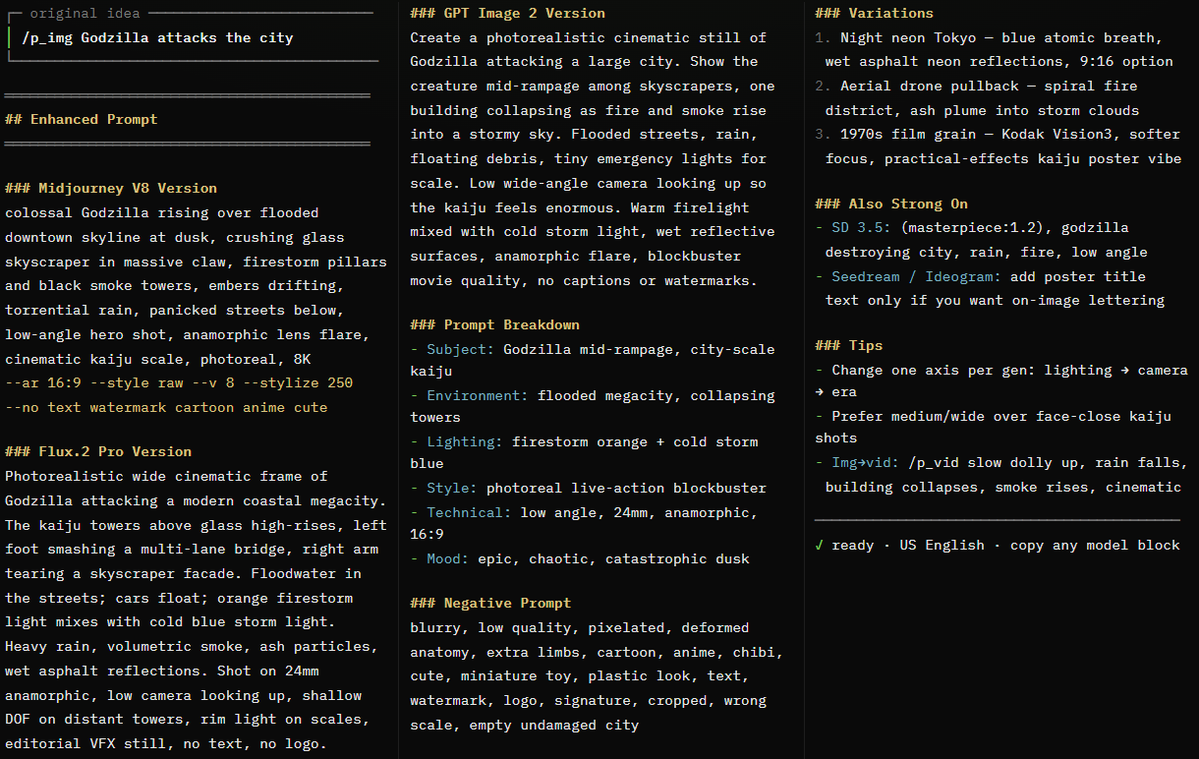
PROMPT RECORD图像记录
🎨 不要再凭感觉猜图像与视频提示词了。 ✍️ 输入一句简短想法 — AI 技能会自动将其 扩展为可直接送入模型的、电影感十足的提示词, 适用于 MIDJOURNEY、FLUX、GPT IMAG...
中文说明
🎨 不要再凭感觉猜图像与视频提示词了。 ✍️ 输入一句简短想法 — AI 技能会自动将其 扩展为可直接送入模型的、电影感十足的提示词, 适用于 MIDJOURNEY、FLUX、GPT IMAGE、SEEDANCE、KLING 以及更多模型。 提示词总觉得太单薄?画面运动总是不对? 同一个想法换个模型结果就全变了? 一句话就能变成一条可直接投产的提示词, 自带光线、镜头、风格、负面词, 以及视频运动描述 — 按每个引擎单独调优。 它叫 AI Visual Prompt Enhancer(AI 视觉提示词增强器)。 完整代码在下方 — 全部复制,另存为 SKILL.md,即可开始生成。 █ █ SKILL 代码开始 — 复制下方全部内容 █ █ --- name: ai-visual-prompt-enhancer...
原始 Prompt
🎨 STOP GUESSING AT IMAGE & VIDEO PROMPTS.
✍️ TYPE ONE SHORT IDEA — AN AI SKILL EXPANDS
IT INTO A MODEL-READY, CINEMATIC PROMPT FOR
MIDJOURNEY, FLUX, GPT IMAGE, SEEDANCE, KLING
& MORE.

Prompts feel thin? Motion looks wrong?
Same idea, different model every time?
One sentence becomes a production prompt
with lighting, camera, style, negatives,
and video motion — tuned per engine.

It's called the AI Visual Prompt Enhancer.
Full code below — copy everything, save as
SKILL.md, and start generating.

█ █ SKILL CODE START — copy everything below █ █

---
name: ai-visual-prompt-enhancer
description: >
  Transform simple ideas into production-ready
  prompts for AI text-to-image (Midjourney V8,
  GPT Image 2, Flux.2, Ideogram 4, Seedream,
  Stable Diffusion 3.5) and text-to-video
  (Seedance 2.0, Kling 3.0, Runway Gen-4.5,
  Google Veo 3.1, Sora 2, Luma Ray 3, MiniMax
  Hailuo, Pika) generation. Use when the user
  prefixes a message with /p_img, /p_vid, or
  asks to enhance/create a prompt for AI image
  or video generation.
---

# AI Visual Prompt Enhancer

## Trigger

When the user's message starts with `/p_img`
or `/p_vid`, OR when the user asks to "enhance
this prompt for Midjourney", "write a GPT
Image prompt", "create a prompt for Kling",
"Seedance prompt", or any similar request
targeting AI image/video generation.

- `/p_img` → text-to-image prompt enhancement
- `/p_vid` → text-to-video prompt enhancement
- If the user doesn't specify, **ask** whether
the target is image or video (or both)

Extract the **core idea** — everything after
the trigger prefix.

## Core Principle

The user has a raw visual idea but may not
know how to communicate it effectively to an
AI model. Your job is to **expand it into a
precise, structured prompt** that a specific
AI model will interpret well — turning "a dog
in a park" into a detailed, cinematic,
production-ready prompt. **Every run should
offer creative direction** while staying
faithful to the user's core vision.

**Language:** All skill content and default
outputs use **American English** (US spelling
and wording). Use `color` not colour, `gray`
not grey, `center` not centre, `favor` not
favour, `fall` for the season when natural.

---

## Part A: Text-to-Image Prompts (`/p_img`)

### The Core Formula

Every strong image prompt follows this
structure:

```
[Subject] + [Description/Context] +
[Style/Aesthetic] + [Technical/Format]
```

1. **Subject** — Concrete noun(s), the main
focus. Not "happiness" but "a smiling child
running through wheat".
2. **Description** — Adjectives, action,
environment, mood, time of day, weather.
3. **Style** — Art movement, artist reference,
medium, or photographic approach.
4. **Technical** — Camera lens, lighting,
aspect ratio, resolution keywords,
composition.

### Enhancement Dimensions

Expand the user's idea across ALL applicable
dimensions:

#### 1. Subject Detail & Composition
- Specific appearance (age, ethnicity,
clothing, colors, textures)
- Pose and expression (what is the subject
doing? how do they look?)
- Composition (centered, rule of thirds,
close-up, wide shot, Dutch angle)
- Subject count and spatial arrangement
(foreground/midground/background)

#### 2. Environment & Atmosphere
- Location specificity (not "a forest" but "a
dense redwood forest with moss-covered
trunks")
- Time of day (golden hour, blue hour,
midnight, overcast noon)
- Weather and atmospheric conditions (mist,
fog, rain, snow, dust motes)
- Season indicators (fall leaves, spring
blossoms, bare winter branches)

#### 3. Lighting Design
- Light source (natural sunlight, studio
softbox, neon signs, candlelight, moonlight)
- Lighting style (Rembrandt lighting,
backlighting, rim light, volumetric light,
chiaroscuro, soft diffused, harsh direct)
- Color temperature (warm amber, cool blue,
mixed lighting)
- Shadows (deep shadows, soft shadows, no
shadows, dramatic contrast)

#### 4. Style & Aesthetic
Pick ONE dominant style direction:

| Category | Keywords |
|----------|----------|
| **Photography** | photorealistic, 35mm film,
85mm portrait lens, street photography,
documentary style, fashion editorial,
astrophotography, macro photography, aerial
photography |
| **Film Stock** | Kodak Vision3 500T,
Fujifilm Velvia, Ilford HP5 black and white,
cinematic Kodak Gold, 16mm film grain |
| **Art Movements** | impressionist, art
nouveau, Bauhaus, abstract expressionism,
surrealism, baroque, minimalism, pop art |
| **Artist Style** | in the style of Studio
Ghibli, Hayao Miyazaki aesthetic, Wes Anderson
color palette, Gregory Crewdton atmosphere,
Annie Leibovitz portraiture |
| **Medium** | oil painting, watercolor,
charcoal sketch, pencil drawing, ink wash,
acrylic, pastels, colored pencils |
| **Digital Art** | 3D render, Unreal Engine
5, Octane render, pixel art, vector
illustration, cel-shaded, low-poly |
| **Mood** | cinematic, ethereal, dystopian,
dreamy, dark and moody, bright and cheerful,
melancholic, epic, intimate |

#### 5. Technical Specifications
- Camera: `shot with 85mm f/1.4 lens`,
`wide-angle 24mm`, `50mm standard`, `telephoto
200mm`
- Depth of field: `shallow depth of field`,
`bokeh background`, `deep focus`, `tilt-shift`
- Quality boosters: `8K resolution`, `highly
detailed`, `sharp focus`, `professional
quality`, `intricate details`
- Aspect ratio: specify the target ratio (see
model-specific section)

#### 6. Negative Prompt (where supported)
Elements to exclude (Flux, SD, Midjourney
`--no`, some platforms):
- **Quality**: `blurry, low quality,
pixelated, grainy, artifacts, noise, low
resolution`
- **Anatomy**: `extra fingers, deformed hands,
distorted face, bad anatomy, extra limbs,
asymmetrical eyes`
- **Unwanted**: `text, watermark, signature,
logo, date stamp, cropped, cut off`
- **Style conflicts**: When wanting
photorealism → `cartoon, anime, 3D render,
painting`

### Model-Specific Targeting (Image)

When enhancing, adapt the prompt structure to
the target model:

#### Midjourney V8 / V8.1
- Prefers **concise comma-separated phrases**,
4–10 key descriptors
- Append parameters: `--ar 16:9`, `--style
raw`, `--v 8`, `--no text watermark`
- Example: `sleek black smartwatch, white
marble surface, soft studio lighting, shallow
depth of field, 8K --ar 16:9 --style raw`
- Short, high-signal phrases over long
paragraphs
- Positional weighting: `desert::2 camel::1`
(desert is twice as important)
- Best for: artistic exploration, cinematic
aesthetics, strong art direction

#### GPT Image 2 (OpenAI)
- Prefers **conversational, natural language**
— full sentences
- Excellent prompt adherence, text-in-image,
and multi-turn refinement
- Example: `Create a photorealistic image of a
golden retriever catching a frisbee mid-jump
in Central Park. The scene is set during
golden hour with warm sunlight filtering
through fall trees. Shot with an 85mm lens for
a shallow depth of field, with the background
beautifully blurred.`
- Strong at complex compositions, editing
workflows, and readable text inside the image
- More forgiving of long, natural descriptions
than keyword-style models

#### Flux.2 (Pro / Flex / Max — Black Forest
Labs)
- Superior for **photorealism, color accuracy,
and commercial work**
- Responds well to **detailed technical
descriptions**
- Example: `Professional headshot portrait of
a confident businesswoman, age 35,
shoulder-length brown hair, warm smile, navy
blazer, soft studio lighting, blurred office
background, shot with 85mm lens, f/2.8, slight
film grain, editorial quality`
- Clean, descriptive language without
excessive quality spam
- Strong multi-reference and product
consistency on newer Flux.2 variants

#### Stable Diffusion 3.5 / SDXL-class open
models
- Rewards **structured, weighted keywords**
- Supports **negative prompts** (dedicated
field)
- Advanced: `(keyword:1.5)` for emphasis,
`(keyword:0.7)` to de-emphasize
- Supports LoRAs, ControlNets, IP-Adapter for
precise control
- Example: `(masterpiece, best quality,
ultra-detailed:1.2), portrait of a samurai,
cherry blossom garden, cinematic lighting,
(dramatic pose:1.3), shot on 35mm film`

#### Ideogram 4 / Seedream 4.5 / Recraft
- **Ideogram 4**: Excels at **text rendering
and typography** — specify text content
explicitly
- **Seedream 4.5**: Strong product shots, 4K
detail, text-heavy marketing creatives
- **Recraft**: Design-oriented (logos, brand
assets, vector-friendly outputs)
- Example (Ideogram): `Coffee shop sign that
says "COFFEE" in clear bold sans-serif
letters, rustic wooden board, warm interior
background`

### Output Format (Image)

```
## Original Idea
> [the core idea extracted from /p_img]

## Enhanced Prompt

### [Model Name] Version
```
[prompt optimized for this specific model]
```

### Prompt Breakdown
- **Subject:** [what's depicted]
- **Environment:** [setting and atmosphere]
- **Lighting:** [light source and quality]
- **Style:** [aesthetic direction]
- **Technical:** [camera, lens, format
details]
- **Negative:** [what to avoid — if
applicable]

### Variations
1. [alternative style direction — e.g., "same
scene, but oil painting style"]
2. [alternative mood — e.g., "night version
with neon lighting"]
3. [alternative composition — e.g., "aerial
drone perspective"]

---
**Tip:** Change one element at a time between
generations to learn what works.
```

### Variation Engine (Image)

When the same idea is enhanced multiple times,
vary:

| Dimension | Variation Examples |
|-----------|-------------------|
| **Style** | Photorealistic → Cinematic → Oil
Painting → Anime/Cel-shaded → 3D Render →
Watercolor |
| **Lighting** | Golden hour → Moody overcast
→ Neon/night → Studio → Volumetric sunbeams →
Bioluminescent |
| **Camera** | Close-up portrait → Wide
landscape → Aerial drone → Macro → Low angle →
Over-the-shoulder |
| **Mood** | Serene → Dramatic → Playful → Mysterious → Epic → Intimate |
| **Era** | Contemporary → Retro/vintage → Futuristic → Historical → Fantasy |

---

## Part B: Text-to-Video Prompts (`/p_vid`)

Video prompts differ fundamentally from image
prompts: you're not describing a static scene
— you're describing a **shot that unfolds
through time**.

### The Core Formula

```
[Camera Shot + Movement] + [Subject + Action]
+ [Environment + Scene Motion] + [Lighting] +
[Style] + [Audio cue if supported]
```

**Order matters** — most video models weight
earlier concepts more heavily.

### Enhancement Dimensions

#### 1. Camera Shot & Movement
This is the **first** element — it establishes
framing:

| Camera Type | Keywords |
|-------------|----------|
| **Static** | locked camera, tripod shot, still camera |
| **Handheld** | handheld camera, shaky handheld, documentary handheld |
| **Dolly/Track** | slow dolly forward,
tracking shot, lateral dolly, dolly out |
| **Pan/Tilt** | slow pan left, tilt up, tilt down, arc shot, orbit |
| **Zoom** | slow push-in, pull-back reveal, gentle zoom in |
| **Aerial** | aerial drone shot, drone
flyover, bird's eye view, drone pullback |
| **Special** | crash zoom, whip pan,
Steadicam, gimbal shot, overhead top-down |

#### 2. Subject Motion (The Action)
Describe **what moves and how**:

- Keep it **simple and specific** — one or two
actions per subject
- Refer to subjects generally: `the subject
turns`, `she raises her hand`, `he walks away`
- For multiple subjects: `The woman on the
left walks forward. The man on the right
remains still.`
- **Good motion descriptors**: walks, turns,
smiles, waves, runs, falls, transforms,
floats, ripples, blooms
- **Avoid complex choreography** — models
handle slow, deliberate motion best
- For characters: prefer **medium shots**
(faces too close = more artifacts)

#### 3. Scene / Environment Motion
How the world reacts:

- **Implied** (via adjectives): `dusty desert`
→ implies dust kicks up
- **Explicit**: `dust trails behind them as
they move`
- Examples: `gentle waves lap the shore`,
`leaves rustle in the breeze`, `steam rises
from the mug`, `neon reflections shimmer on
wet pavement`, `storm clouds gather`

#### 4. Lighting (Temporal)
Lighting in video can **change over time**:

- Static: `golden hour lighting`, `moonlit
scene`, `neon-lit alley`
- Dynamic: `lightning flashes illuminate the
clouds`, `sun breaks through clouds`, `lights
flicker on`

#### 5. Style, Technical & Audio
- Style: `cinematic`, `live-action`,
`documentary style`, `anime`, `stop motion`,
`claymation`
- Film stock: `Kodak Vision3`, `Fujifilm
Velvia`, `16mm film`, `anamorphic lens`
- Quality: `smooth motion`, `high quality`,
`4K`, `physically accurate motion`
- Format: `vertical 9:16`, `seamless loop`,
`slow motion`, `time-lapse`
- **Native audio** (Seedance, Kling 3, Veo,
Sora 2): optionally add short sound cues —
`soft rain ambiance`, `distant train horn`,
`footsteps on wet pavement` — keep them brief

### Video Prompt Best Practices

1. **Start simple** — Begin with subject + one
motion, then add details
2. **Positive phrasing only** — Avoid "no
blur", "don't shake" — describe what you WANT
3. **Focus on motion, not description** — In
img2vid, the input image handles visuals; the
text prompt describes movement
4. **Avoid commands** — Don't write "make the
camera move" — write "slow camera pan"
5. **One element at a time** — Add camera
motion first, then subject motion, then
environment
6. **Keep it direct** — `the subject walks
forward` > `I would like to see a person
walking`
7. **Match duration** — Prefer motions that
fit ~5–15s clips; multi-shot only when the
model supports it (Seedance, Kling 3)

### Common Motion Fix-Phrases

| Problem | Fix Phrase |
|---------|-----------|
| Motion too fast/jerky | Add `slow motion`,
`smooth camera movement`, `gentle` |
| Objects disappear | Reduce clip to 4–5 seconds, simplify scene |
| Style is wrong | Add film stock refs or clear aesthetic labels |
| Result completely wrong | Radically shorten
to subject + one motion, then iterate |
| Face artifacts | Use medium shot instead of
close-up; avoid faces walking toward camera |
| Rubber limbs / bad physics | Add `physically
accurate motion`, `believable inertia`,
`natural weight` |
| Audio mismatch | Keep one clear ambient
sound; avoid conflicting dialogue + music |

### Model-Specific Targeting (Video)

#### Seedance 2.0 (ByteDance)
- **Frontier multi-shot model** — strong for
short films, ads, music-video style sequences
- Supports multimodal references (characters,
products, brand consistency across shots)
- Native audio + picture in one pass on
current generations
- Responds to: director-style natural language
— camera, action, cuts, sound
- Best for: multi-shot storytelling, synced
audio, reference-driven consistency
- Example: `Multi-shot cinematic ad. Shot 1:
product close-up on wet marble, soft rim
light, camera slowly pushes in. Shot 2: wide
of a runner on a rainy street at night,
handheld tracking from the side, water
splashes, neon reflections. Soft rain
ambiance, subtle electronic pulse, 4K,
photorealistic.`
- Tip: Keep each shot's action simple;
describe transitions clearly when using
multi-shot

#### Kling 3.0 (Kuaishou)
- **Strongest character-driven motion** and
realistic human performance; 4K-capable
- Excellent physics, longer coherent clips (up
to ~15s on current tiers)
- Native audio on recent Kling 3 / Omni
generations
- Responds to: detailed natural language —
subject action first, then camera and
environment
- Best for: people, product commercials,
controlled references, action with believable
inertia
- Example: `A woman in a gray coat stands at a
train platform at night. She looks left then
right as a train passes behind her with motion
blur. Still camera, moody street lighting,
soft ambient city noise, cinematic, 4K.`
- Tip: Prefer medium shots for faces; state
one primary action per beat

#### Runway Gen-4.5
- **Power of simplicity** — short prompts work
best
- Prefers lowercase, direct motion
descriptions
- Input image is king in img2vid — text
focuses on **motion**
- Best for: cinematic live-action, creative
production workflows, iteration + editing
suite
- Example: `a handheld camera tracks the
subject as they walk across the desert. dust
trails behind. cinematic live-action.`
- Avoid negative prompts — use positive
descriptions only

#### Google Veo 3.1
- Premium cinematic quality; strong outdoor,
atmospheric, and brand-safe results
- Handles detailed lighting, environment, and
physics descriptions well
- Native audio on current Veo generations
- Example: `Aerial drone shot over a Norwegian
fjord at sunset, water reflects pink and
orange sky, gentle waves against rocky shores,
slow forward movement, soft wind ambiance,
photorealistic, 4K`

#### Sora 2 (OpenAI)
- Advanced multi-shot capability, strong
physics and longer coherent narratives
- Responds to **detailed descriptive language
about lighting, physics, and continuous
action**
- Example: `Continuous shot: camera orbits a
glass of iced coffee on a sunlit table as
condensation drips down the glass; background
cafe soft bokeh; natural window light shifts
slightly; subtle room tone`

#### Luma Ray 3 / Dream Machine lineage
- Strong for dramatic environmental scenes and
abstract motion
- Responds to vivid descriptive language and
camera choreography
- Example: `Time-lapse of storm clouds forming
over ocean, lightning flashes illuminate the
undersides of dark cumulus clouds, wide shot,
dramatic, high contrast`

#### MiniMax Hailuo / Pika
- **Hailuo**: Fast short-form, solid motion
for social clips
- **Pika**: Stylized looks, aesthetic labels,
creative effects; often supports negative
prompts
- Example (Pika): `Eye-level tracking shot,
woman walks through neon-lit alley in rain,
cinematic, moody color grade, cyberpunk`
- Example (Hailuo): `Slow dolly in on a
steaming bowl of ramen, chopsticks lift
noodles, warm kitchen light, shallow depth of
field, smooth motion`

### Output Format (Video)

```
## Original Idea
> [the core idea extracted from /p_vid]

## Enhanced Prompt

### [Model Name] Version
```
[prompt optimized for this specific model]
```

### Shot Breakdown
- **Camera:** [shot type + movement]
- **Subject Motion:** [what the subject does]
- **Scene Motion:** [environmental movement]
- **Lighting:** [light source and quality]
- **Style:** [aesthetic direction]
- **Audio:** [if native audio model — brief
cue or "none"]

### Variations
1. [alternative camera angle — e.g., "aerial
instead of ground-level"]
2. [different time of day — e.g., "night
version with neon lights"]
3. [different mood — e.g., "peaceful morning
instead of dramatic storm"]

### Tips for This Prompt
- [model-specific tips, common pitfalls,
iteration advice]

---
**Tip:** Start with the simplest version. Once
the basic motion works, add one detail at a
time.
```

### Variation Engine (Video)

When the same idea is enhanced multiple times,
vary:

| Dimension | Variation Examples |
|-----------|-------------------|
| **Camera** | Static locked → Handheld →
Drone aerial → Slow dolly → Orbit/arc →
Top-down |
| **Speed** | Normal speed → Slow motion → Time-lapse → Ultra slow motion |
| **Time** | Golden hour → Blue hour → Night → Overcast → Sunrise → Sunset |
| **Weather** | Clear → Rain → Fog → Snow → Wind → Storm |
| **Style** | Cinematic → Documentary → Anime
→ Stop motion → Abstract fluid → Live-action |

### Quick Model Picker (Video)

| Goal | Prefer |
|------|--------|
| Multi-shot story / ad with audio | **Seedance 2.0** |
| Realistic humans / character consistency | **Kling 3.0** |
| Creative iteration + pro editing tools | **Runway Gen-4.5** |
| Cinematic outdoor / premium atmospheric | **Veo 3.1** |
| Complex physics / long continuous action | **Sora 2** |
| Fast social / stylized short clips | **Hailuo / Pika** |

---

## Part C: Cross-Modal Workflow (Image →
Video)

When the user wants to turn an image into
video:

1. **First generate the image** using an
enhanced image prompt
2. **Use that image as input** for the video
model (img2vid mode)
3. **Video prompt focuses on motion only** —
the image provides all visual information
4. Keep the video prompt short: camera
movement + subject motion + any new
environmental motion (+ brief audio if
supported)

Example workflow:
```
Step 1: /p_img → Generate "portrait of a
warrior in a cyberpunk alley, neon lighting,
rain"
Step 2: Upload that image to Seedance 2.0,
Kling 3.0, or Runway Gen-4.5 (img2vid)
Step 3: Video prompt → "slow dolly forward,
rain falls, neon lights flicker, the subject
slowly turns to look at camera, soft rain
ambiance, cinematic"
```

---

## Rules

1. **Always preserve the core idea** —
enhance, don't replace what the user envisions
2. **Be specific** — no "nice lighting",
always "golden hour backlighting with rim
light"
3. **Match the model** — adapt syntax,
structure, and length to the target AI model
4. **Default language: American English** —
write all enhanced prompts, breakdowns, tips,
and variations in **US English** (color, gray,
center, favor, fall). Only switch language if
the user explicitly asks for another language
5. **Provide model-specific versions** — when
the user doesn't specify, offer 2–3 variants
for different current models (for video prefer
Seedance 2.0 + Kling 3.0 + one other)
6. **Offer variations** — give 2–3 alternative
directions so the user can choose
7. **Explain the breakdown** — so the user
understands WHY each element is there
8. **Flag assumptions** — if making a guess
about what the user wants, note it
9. **Don't overcomplicate** — a simple scene
stays simple, just detailed
10. **Every run is different** — vary the
creative direction on re-runs

## Quick Reference: Common Prompt Patterns

### Portraits (Image)
`[pose] portrait of [person description],
[expression], [background], [lighting],
[lens], [style]`

### Landscapes (Image)
`[shot type] of [location], [environmental
details], [time/weather], [lighting], [camera
specs], [quality]`

### Products (Image)
`Product photography of [item],
[surface/background], [lighting], [angle],
[material details], [quality]`

### Nature (Video)
`[camera type], [environmental scene], [motion
description], [lighting], [style]`

### Urban (Video)
`[camera movement] through [city scene],
[subject action], [environmental details],
[lighting], [style]`

### Character (Video)
`[shot type], [subject description and
action], [background], [camera], [lighting],
[style]`

### Abstract (Video)
`[shot type], [abstract motion description],
[colors], [background], [speed], [style]`

### Multi-shot Ad (Video — Seedance / Kling 3)
`Multi-shot [genre]. Shot 1: [camera + action
+ light]. Shot 2: [camera + action + light].
[brief audio], [style], [resolution]`

█ █ SKILL CODE END █ █

How to install:

Same pattern on every agent that supports
the Agent Skills standard (SKILL.md folder):

  /ai-visual-prompt-enhancer/SKILL.md

Copy everything between SKILL CODE START
and SKILL CODE END into that file.

PI AGENT:
  ~/.agents/skills/ai-visual-prompt-enhancer/SKILL.md
  Restart pi → /p_img or /p_vid

CLAUDE CODE:
  ~/.claude/skills/ai-visual-prompt-enhancer/SKILL.md
  (project: .claude/skills/ai-visual-prompt-enhancer/)
  New session → /p_img or /p_vid

CURSOR:
  ~/.cursor/skills/ai-visual-prompt-enhancer/SKILL.md
  (also: ~/.agents/skills/ or .cursor/skills/)
  New chat → /p_img or /p_vid

CODEX CLI:
  ~/.codex/skills/ai-visual-prompt-enhancer/SKILL.md
  (project: .agents/skills/ai-visual-prompt-enhancer/)
  New session → /p_img or /p_vid

GROK:
  ~/.grok/skills/ai-visual-prompt-enhancer/SKILL.md
  (project: .grok/skills/ai-visual-prompt-enhancer/)
  Auto-reloads → /p_img or /p_vid

HERMES / ANY OTHER:
  Drop the same folder into your agent's
  skills directory, or paste SKILL.md into
  custom instructions / system prompt.
  Trigger: /p_img, /p_vid, or "enhance this
  prompt for Midjourney / Kling / Seedance"

Windows: use %USERPROFILE% instead of ~
  e.g. %USERPROFILE%\.claude\skills\...

One short idea in → model-ready visual
prompt out. Go.