 1/2
1/2
PROMPT RECORD图像记录
每天只睡5个小时、连续坚持两周后,我终于睡足了8个小时,感觉自己像重获新生一般。 借着这股重新焕发的精力,我想简单分享一下制作这支MV时的心得与学到的教训。 这是我在视频制作方面作为一个完全的...
中文说明
每天只睡5个小时、连续坚持两周后,我终于睡足了8个小时,感觉自己像重获新生一般。 借着这股重新焕发的精力,我想简单分享一下制作这支MV时的心得与学到的教训。 这是我在视频制作方面作为一个完全的初学者,烧掉海量积分后总结出的经验。 我会尽量简洁明了,基于 Seedance 2.0 来讲。 第一,附加角色参考图(character sheet)不是可选项,而是必不可少的。 像附图那样简单地制作角色参考图即可。 如果没有近距离特写图,生成模型可能会模糊角色的面部细节,或者随心所欲地进行诠释。 身体和服装方面,提供正面和背面视角就足够了。 不需要包含各种面部表情。 事实上,这些反而可能成为模型漂移(model drift)的原因。 第二,关于提示词的结构与简洁性。 明确指定每个图像参考槽位中图像的角色。 在 CHARA...
原始 Prompt
After sleeping only 5 hours a day for two weeks, I finally got 8 hours of sleep, and I feel like I've been reborn.

With this renewed energy, I'd like to briefly share my thoughts and the lessons I learned while making this MV.

These are my experiences after burning through a huge number of credits as a complete beginner in video production.

I'll keep it simple and concise, based on Seedance 2.0.

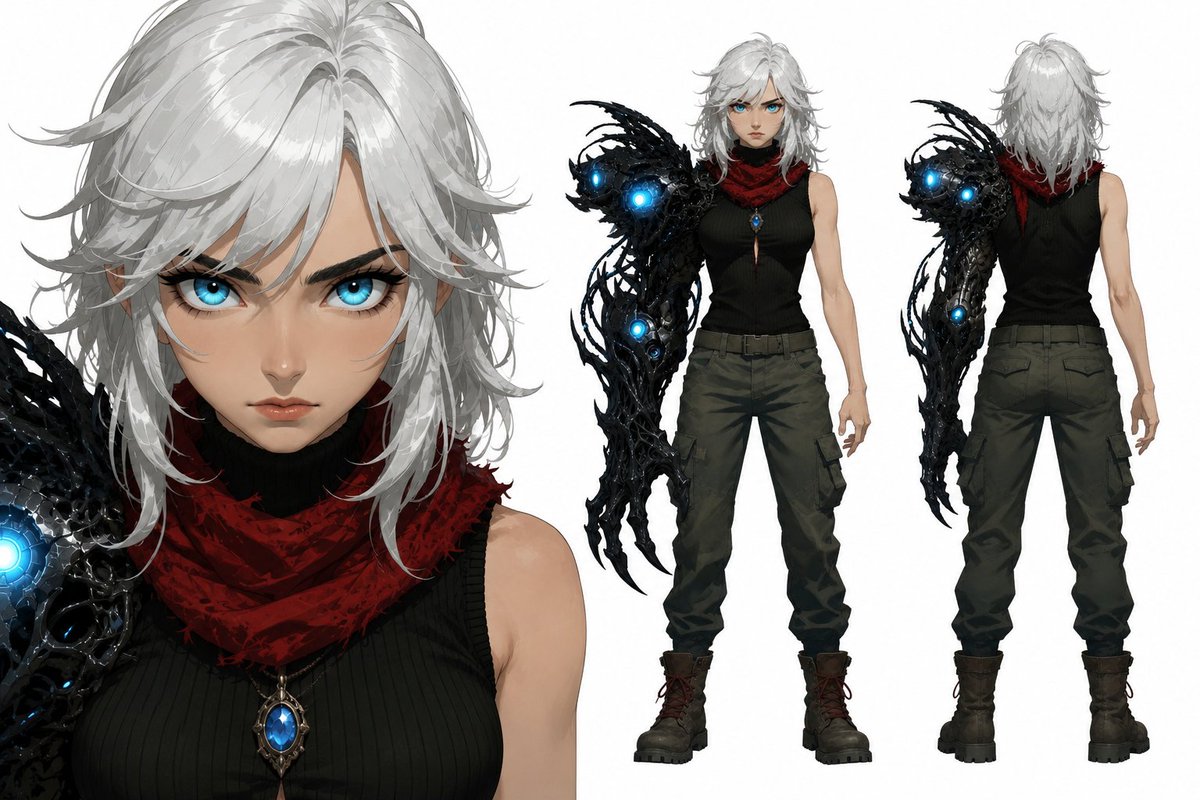
First, attaching a character sheet is not optional—it's essential.

Create the character sheet simply, like the attached image.

If you don't have close-up images, the generation model may blur the character's facial details or interpret them however it wants.

For the body and outfit, front and back views are enough.

You don't need to include various facial expressions.

In fact, they can even become a cause of model drift.

Second, about prompt structure and conciseness.

Specify the role of each image in the image reference slots.

In the CHARACTER block, explicitly describe the girl's appearance in text.

Number of characters appearing

This turned out to be a completely unexpected variable for me.

For example, if I didn't include text like "One girl, one elite guardian. Maintain visual consistency with all references.", I found that duplicate copies of each character were generated much more often than I expected.

This happened especially when three or more main characters appeared in the same shot.

In the STYLE block, write only the essentials about the art style, lighting, and rendering method as briefly as possible.

For realistic, semi-realistic, or 2D styles that Seedance already handles well, this prompt isn't really necessary.

But for 2.5D, which Seedance struggles with, it helped a little.

It doesn't have nearly as much impact as image references.

(Optional)

Overall tempo instructions for the clip's pacing and mood.

This is also optional, but in my case I needed extremely fast-paced action.

Before adding this instruction, the pacing felt as slow and frustrating as a sloth.

Expression lock instructions

(Optional depending on your needs)

Describe scene events in order, separated into CUT 1, CUT 2, and so on.

Seedance follows second-by-second CUT instructions surprisingly well.

Think and direct from the director's chair.

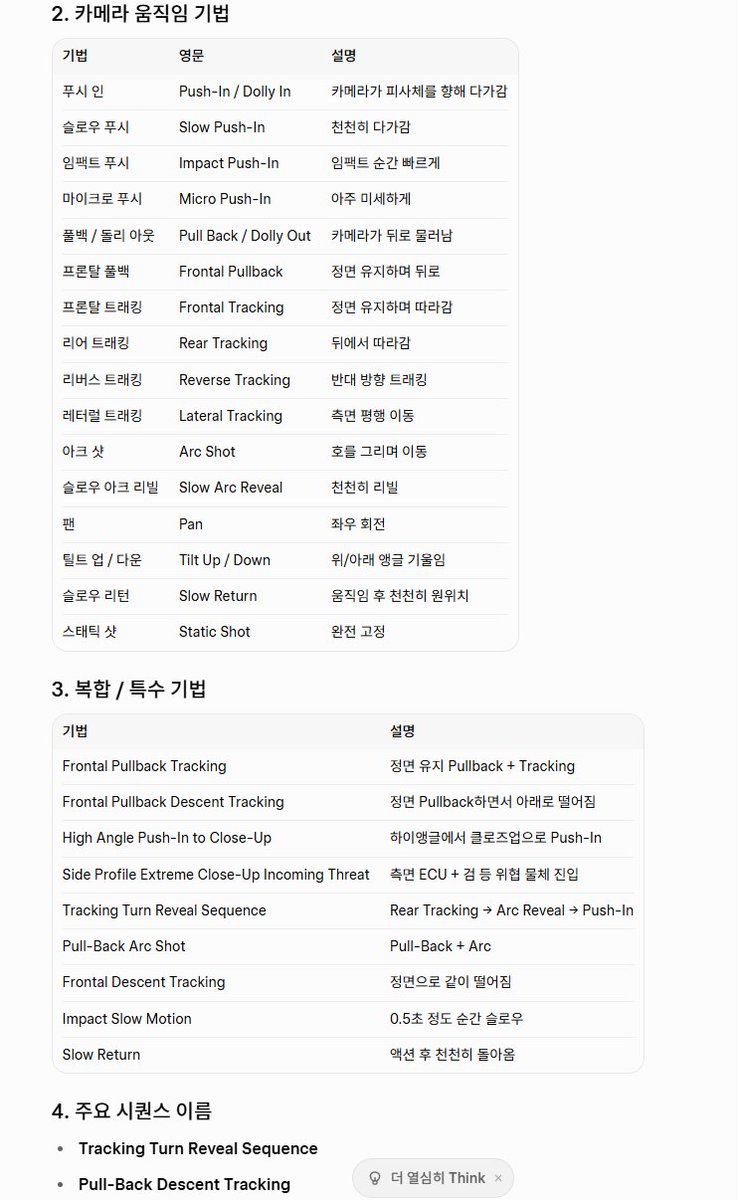
Camera work

Honestly, this is the most important part of video production.

It's the core element that determines the mood and quality of the video.

Even if the characters themselves aren't particularly attractive, compelling backgrounds combined with good camera work can create beautiful cinematic shots.

I couldn't memorize all the terms, so I organized various cinematic camera movements, including angle and composition terminology, into a chart for quick reference.

Final frame description—the still image at the exact moment the clip ends.

This part can also be omitted, but I recommend using it if you have a specific ending frame in mind.

That's it for the prompt structure.

Second, keep your prompts as short and concise as possible.

Especially when your scene contains too many events for the selected video length, the entire clip tends to fall apart surprisingly often.

Our credits are precious, aren't they?

Third, unless you specifically want it, always specify "No background music."

It only gets in the way during editing.

It's better to use Suno or another good external audio source.

Fourth, use Mini or Fast for testing, and if your scene contains bold action, I recommend testing with Standard (Low Quality) before using those two.

It's not easy to get a successful result on the first generation.

Unless you've reached a professional level, this lottery called the [Generate button] will force you to revise your prompts over and over again, so saving credits is better for your mental health.

Fifth, don't expect a great video from your very first Generate.

It only increases your stress.

Unless you're already a professional, expecting a perfect 15-second clip on your first attempt is just setting yourself up for disappointment.

Try multiple times, then edit and combine the results.

That's how you'll end up with a satisfying final video.

Here are two clips from the many failed generations.

They failed, but they still had some usable shots.

Of course, I didn't use them because better ones came later, but most failed clips contain hidden gems worth saving—sometimes as much as half of the 15-second clip.

The production schedule wasn't easy, and I accumulated quite a bit of fatigue, but the joy the final result gave me was greater than all of that.

Unfortunately, it wasn't chosen by the algorithm,

but I'd like to believe that I grew one step further through this MV.

Now that I've completed the MV that started it all, I'm preparing for a new challenge.

I'll probably move toward a new world-building approach while focusing mainly on the short clips that the algorithm prefers.

With that, I'll end this long post, and I wish all video creator communities the very best. 👏👏