PROMPT RECORD图像记录
一个美国胖乎乎的小男孩,穿着休闲的居家T恤,坐在卧室的书桌前,卧室环境是普通日常的,有真实的生活感。镜头像前置手机自拍,竖屏9:16,近景,头肩构图,带有轻微的手持运动感,像随意自录的小视频。...
中文说明
一个美国胖乎乎的小男孩,穿着休闲的居家T恤,坐在卧室的书桌前,卧室环境是普通日常的,有真实的生活感。镜头像前置手机自拍,竖屏9:16,近景,头肩构图,带有轻微的手持运动感,像随意自录的小视频。0–1.5秒他自然地看着镜头,1.5–2.3秒他自然地在脸旁抬起一只手弹一次响指,2.3–3秒他放下手,3–6秒他慢慢将脸靠近镜头,同时头部微微左右转动。他的表情保持放松自然,动作真实连贯,没有夸张的表演,没有说话,没有多余的手势,没有镜头切换,也没有场景变化。 工具:https://t.co/LQ1R3ruV01 2. 我使用 nano banana pro 生成了 Homelander 的图片 我将上面视频的第一帧作为参考图,加入 Homelander 的参考图,使用 nano banana pro 进行换脸。 提示词...
原始 Prompt
An American chubby little boy wearing a casual home T-shirt, sitting at a desk in his bedroom, with an ordinary everyday bedroom setting and a realistic lived-in feel. Shot like a front-facing phone selfie, vertical 9:16, close-up, head-and-shoulders framing, with slight handheld movement, like a casual self-recorded clip. From 0–1.5s he naturally looks at the camera, from 1.5–2.3s he raises one hand and snaps once naturally beside his face, from 2.3–3s he lowers his hand, and from 3–6s he slowly leans his face closer to the camera while slightly turning his head left and right. His expression stays relaxed and natural, with realistic continuous movement, no exaggerated acting, no talking, no extra gestures, no camera cuts, and no scene changes.
Tool: https://t.co/LQ1R3ruV01

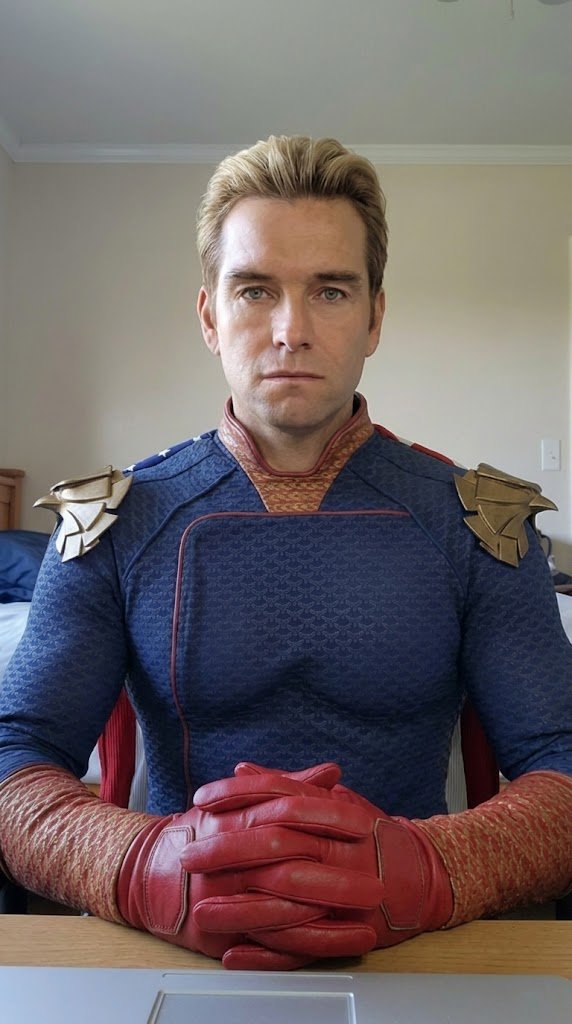
2. I used nano banana pro to generate the Homelander image
I used the first frame from the video above as a reference image, added a reference image of Homelander, and used nano banana pro to do the face replacement.
Prompt:
An image shot with an iPhone front camera. Replace the child in image one with Homelander (reference image two), sitting at a desk in a normal bedroom, with an ordinary everyday bedroom environment and a realistic lived-in feel. Keep the background and pose unchanged. The body proportions should match an adult. Keep the gloves.
Tool: https://t.co/rxvn4Uzl4w

3. I used Kling Motion Control to generate a video with the same movement
This lets Homelander replicate the exact same movement as the original little boy.
Tool: https://t.co/xChgoZI6Tl
Edit everything together in CapCut

4. I combined the two clips in CapCut, and the final result came together.

The whole workflow is actually very simple:
First generate a real motion reference video → then create the target character’s first frame → finally use motion control to recreate the movement.

If you want to make this kind of trending face-swap video too, you can follow this exact workflow and try it yourself. All necessary materials and prompts have been uploaded to our website.