PROMPT RECORD图像记录
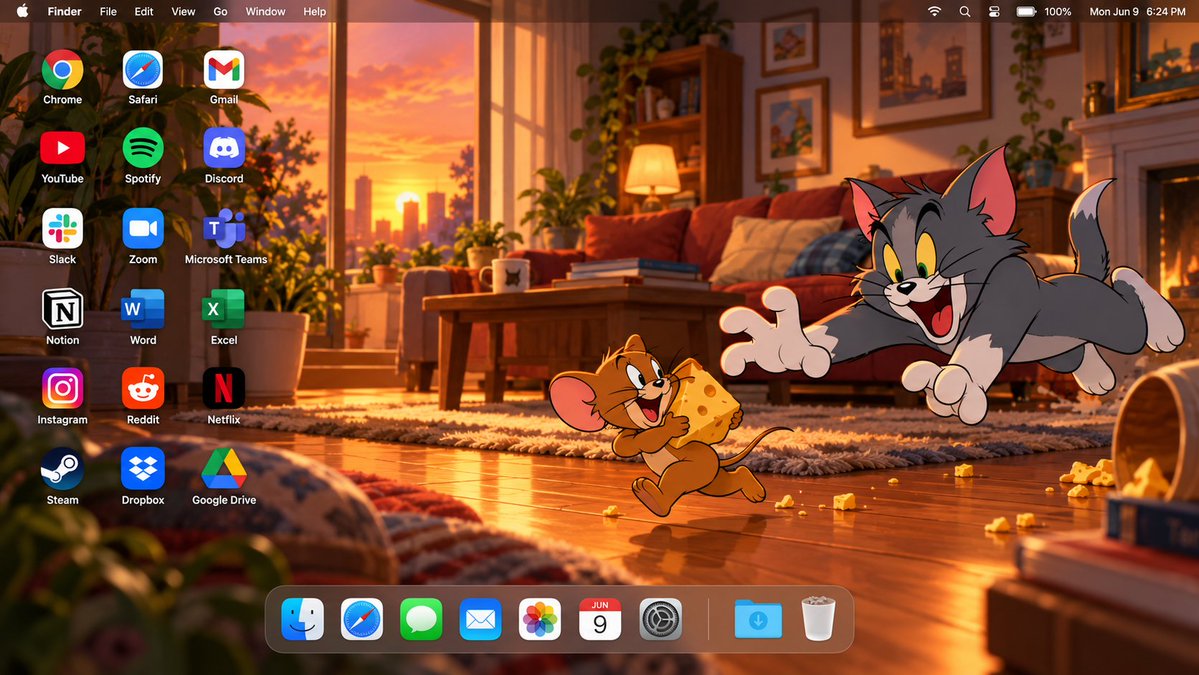
创建一张高端的16:9 macOS桌面壁纸截图,以汤姆和杰瑞为主角。构建一个原创的电影级卡通客厅场景,呈现日落时分,温暖的光线从一侧窗户洒入,木地板、温馨家具、柔和阴影、散落的趣味物件以及微妙...
中文说明
创建一张高端的16:9 macOS桌面壁纸截图,以汤姆和杰瑞为主角。构建一个原创的电影级卡通客厅场景,呈现日落时分,温暖的光线从一侧窗户洒入,木地板、温馨家具、柔和阴影、散落的趣味物件以及微妙的环境纵深感。环境保持原创且精致,犹如一部高品质动画电影背景。 将汤姆和杰瑞一起放置在桌面右侧,营造一个富有表现力的趣味叙事瞬间。保留他们可识别的经典卡通外观、比例、色彩、面部表情以及原始的2D动画美学。汤姆应有夸张的戏剧反应,杰瑞则显得调皮捣蛋。确保两个角色完整可见,不被裁剪,面部、手部、尾巴及重要细节清晰可辨。保持明显的卡通风格,不要写实化或重新设计。 左侧保留用于桌面快捷方式。精确添加18个桌面应用程序图标,按3列6行排列,对齐整齐、尺寸一致、间距宽松,并配以清晰的白色标签。应用程序必须为: Chrome | Saf...
原始 Prompt
Create a high-end 16:9 macOS desktop wallpaper screenshot featuring Tom and Jerry as the main characters. Build an original cinematic cartoon living-room scene at sunset, with warm window light entering from one side, wooden flooring, cozy furniture, soft shadows, scattered playful objects, and subtle atmospheric depth. Keep the environment original and polished, like a premium animated-film background.
Place Tom and Jerry together on the RIGHT side of the desktop in an expressive playful storytelling moment. Preserve their recognizable classic cartoon appearance, proportions, colors, facial expressions, and original 2D animation aesthetic. Tom should react dramatically while Jerry appears mischievous. Keep both characters fully visible, not cropped, with faces, hands, tails, and important details clearly shown. Keep them clearly cartoon-styled, not realistic or redesigned.
Reserve the LEFT side for desktop shortcuts. Add exactly 18 desktop application icons, arranged in 3 columns and 6 rows, with clean alignment, identical sizing, generous spacing, and crisp white labels. The applications must be:
Chrome | Safari | Gmail
YouTube | Spotify | Discord
Slack | Zoom | Microsoft Teams
Notion | Word | Excel
Instagram | Reddit | Netflix
Steam | Dropbox | Google Drive
Do not add extra icons, do not duplicate icons, and do not omit any of them.
Add a realistic translucent macOS menu bar across the full top edge. Include: Apple logo, Finder, File, Edit, View, Go, Window, Help on the left; and Wi‑Fi, battery, control icons, and a clock on the right. Keep it thin, elegant, and clearly macOS-style.
Add a floating translucent macOS Dock along the bottom, positioned slightly toward the LEFT so Tom and Jerry remain unobstructed on the right. Dock icons: Finder, Safari, Messages, Mail, Photos, Calendar, System Settings, separator, Downloads, Trash.
Use warm golden-orange lighting mixed with deep brown, cream, muted red, and soft blue accents. Add subtle cinematic lighting, depth, and atmosphere while keeping the overall image clearly cartoon-styled and clean.
Final result: a premium edge-to-edge high-resolution 16:9 macOS desktop image combining a cinematic cartoon wallpaper with a realistic macOS interface. Balanced composition, strong character integration, polished lighting, clean typography, and clear negative space.
Do not include: laptop frame, monitor frame, keyboard, mouse, open app windows, extra characters, duplicate icons, large titles, advertisements, banners, or watermark.