PROMPT RECORD图像记录
创建一张高分辨率宽屏 16:9 的《模拟人生 4》Create-A-Sim(创建模拟市民)角色创建界面截图,极度忠实于真实 CAS 的布局和视觉语言。 屏幕上只显示角色创建界面,不要房子、不要...
中文说明
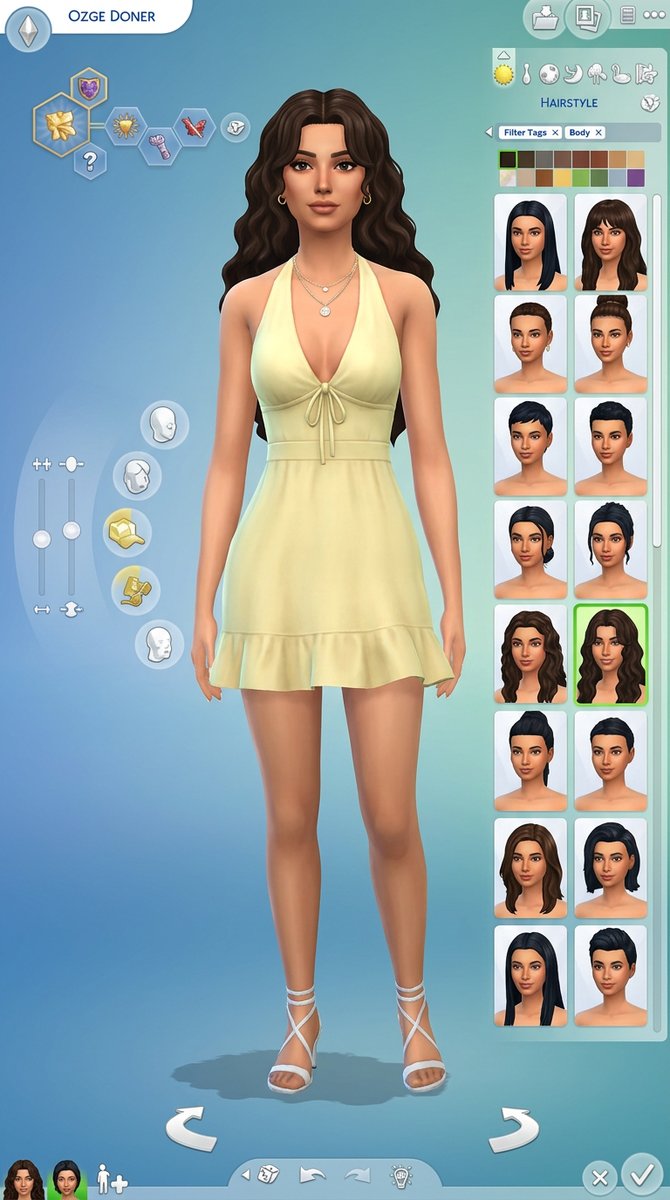
创建一张高分辨率宽屏 16:9 的《模拟人生 4》Create-A-Sim(创建模拟市民)角色创建界面截图,极度忠实于真实 CAS 的布局和视觉语言。 屏幕上只显示角色创建界面,不要房子、不要房间、不要游戏玩法拼贴。使用经典的模拟人生风格蓝到绿渐变背景、柔和的圆角 UI 面板、圆形类别图标、服装和身体自定义图标、发色色板、发型缩略图、筛选标签、滑块、旋转箭头、对勾和 X 按钮,以及左下角的小型角色肖像缩略图。 画面中央站立一个风格化的模拟人生式女性角色,名为 “OZGE DONER”,显示在左上角的名称栏中。她应该像上传的参考女性的模拟人生角色版本:相似的面部和谐感、柔和的女性化特征、暖色调肤色、饱满的嘴唇、轮廓分明的眉毛、杏仁形的眼睛、优雅的表情,以及华丽但游戏化的身材比例。不要让她看起来像真实照片;她应该看...
原始 Prompt
Create a high-resolution wide 16:9 screenshot of a Sims 4 Create-A-Sim character creation interface, extremely faithful to the real CAS layout and visual language.

The screen shows only the character creation interface, no house, no room, no gameplay collage. Use the classic Sims-style blue-to-green gradient background, soft rounded UI panels, circular category icons, clothing and body customization icons, hair color swatches, hairstyle thumbnails, filter tags, sliders, rotate arrows, checkmark and X buttons, and small character portrait thumbnails at the bottom left.

In the center stands a stylized Sims-like female character named “OZGE DONER” shown in the top left name bar. She should resemble the uploaded reference woman as a Sims character version: similar facial harmony, soft feminine features, warm skin tone, full lips, defined brows, almond eyes, elegant expression, and glamorous but game-stylized proportions. Do not make her look like a real photo; she should look like a polished Sims 4 custom content character.

She wears a pale yellow / buttery yellow halter-neck mini dress, tied at the chest with delicate strings, fitted waist, soft draped fabric, small ruffle hem, feminine summer style. Add white or nude strappy heels, subtle gold hoop earrings, delicate layered gold necklaces, and clean manicured nails.

Her hair is long voluminous dark brown wavy hair, center-parted or softly curtain-parted, glossy, romantic, slightly tousled, with face-framing waves. On the right-side UI panel, show the hairstyle category selected with several hairstyle thumbnails, hair color swatches, and the selected wavy hairstyle highlighted with a green outline.

The interface should feel very close to The Sims 4 CAS screen: left-side aspiration/trait hexagon icons, body sliders on the left, curved circular customization menu around the character, right-side hairstyle selection grid, top category icons, bottom rotate controls, and clean UI buttons. Keep all UI elements crisp, readable, and game-like.

Lighting should be soft and even, with the character clearly visible from head to mid-thigh or full body, centered and elegant. The whole image should look like an actual Sims character creation screenshot with high-quality custom content.

Important:
Only Create-A-Sim interface.
No house, no bedroom, no gameplay scene, no collage.
The character must have flawless stylized anatomy, natural arms and hands, correct fingers, realistic pose within Sims style, no distorted limbs.

Negative prompt:
house, bedroom, gameplay screen, collage, real photograph, hyperrealistic human, text errors, misspelled name, messy interface, ugly UI, distorted face, extra fingers, broken hands, deformed anatomy, warped body, low quality, blurry, duplicate characters, wrong outfit color, red dress, blue dress, short hair, straight flat hair