PROMPT RECORD图像记录
先阅读 ABOUT ME,保存到 CLAUDE OUTPUTS,不清楚时使用 AskUserQuestion,不要过度解释。 8:连接器是免费的。把它们打开。 Slack、Gmail、Driv...
中文说明
先阅读 ABOUT ME,保存到 CLAUDE OUTPUTS,不清楚时使用 AskUserQuestion,不要过度解释。 8:连接器是免费的。把它们打开。 Slack、Gmail、Drive、Notion、Figma、Granola 以及其他 50 多个。Claude 会在对话中途读取你的邮件和信息。零复制粘贴。 9:在每个提示中强制使用 AskUserQuestion。 Claude 停止猜测。它会生成一个带有澄清问题的表单。你点击,Claude 执行。提示工程就此结束。 10:在 Excel 中安装 Claude(3 分钟)。 Excel → 插入 → 获取加载项 → 搜索 "Claude by Anthropic" → 添加 → 登录。按 Ctrl+Option+C 打开。现在它知道 D14 单元格实...
原始 Prompt
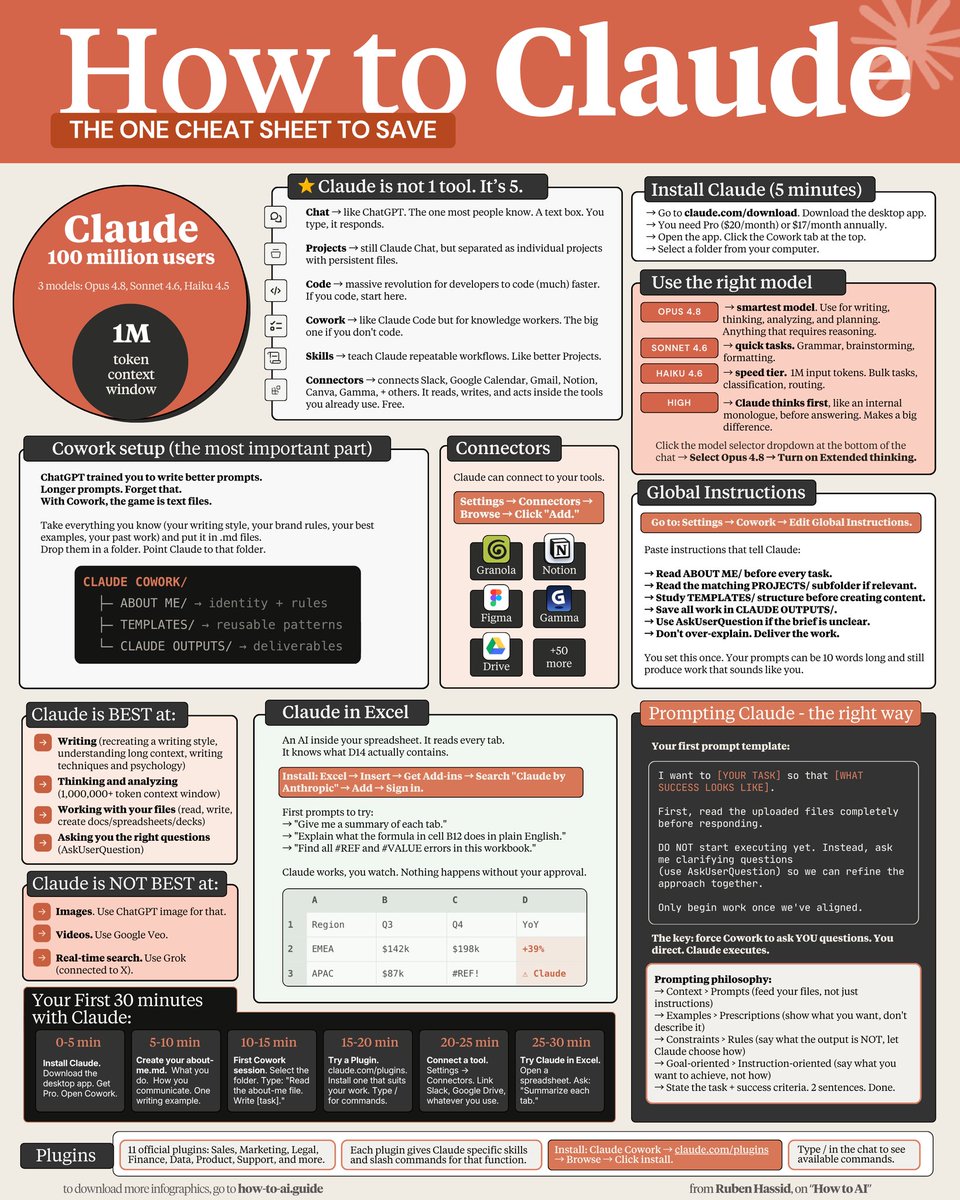
read ABOUT ME first, save in CLAUDE OUTPUTS, use AskUserQuestion when unclear, don't over-explain.

8: Connectors are free. Turn them on.

Slack, Gmail, Drive, Notion, Figma, Granola + 50 others. Claude reads your emails and messages mid-conversation. Zero copy-paste.

9: Force AskUserQuestion in every prompt.

Claude stops guessing. It generates a form with clarifying questions. You click. Claude executes. Prompting ends.

10: Install Claude in Excel (3 minutes).

Excel → Insert → Get Add-ins → Search "Claude by Anthropic" → Add → Sign in. Ctrl+Option+C to open. It now knows what cell D14 actually contains.

11: Install Plugins from claude .com/plugins.

Sales, Marketing, Legal, Finance, Data, Product, Support + more. Each adds skills and slash commands. Type / in the chat to see them.

12: Skills replace your prompt library.

Turn repeat workflows into slash commands. Type /negotiation-prep + one line. Claude pulls from Gmail, Slack, Granola. Drafts the email. Done.

13: Context > Prompts.

Feed your files, not just prompts. That's the game.

Download my own files at https://t.co/KS12xoD7sj.

Don't pay anything. Reply to the email to get the link

14: Examples > Prescriptions.

Paste 3 posts you wrote. "Write like this." Claude copies voice faster from examples than from 500 words of description.

15: Images = Use ChatGPT Image (with Thinking).

Claude doesn't generate realistic images (yet).

16: Real-time search = Use Grok.

Connected to X. Covers 99% of what you need.

17: Videos = Use Google Veo-4

Right tool, right job. Stop wasting tokens.

To download all of my Claude infographics:

Step 1. Go to https://t.co/KS12xoD7sj.

Step 2. Subscribe for free. Don't pay anything.

Step 3. Open my welcome email (most skip this).

Step 4. Hit the automatic reply button inside.

Step 5. Download my infographics from my Notion.

Bonus. Enjoy my best copy-paste prompts, too.