PROMPT RECORD图像记录
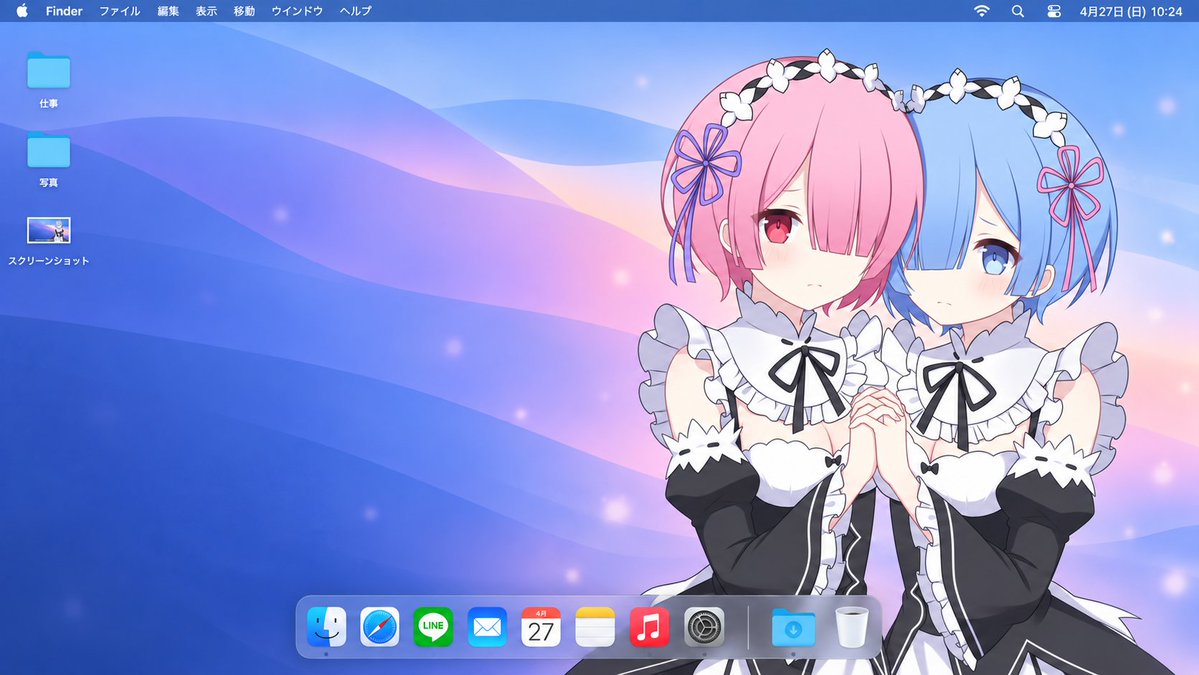
以上传的图像作为主体参考,创作一幅精致的16:9 macOS桌面构图。 主体: 识别参考中的主要主体或角色,并保留其可识别的外观、面部特征、发型、服装、配饰、比例以及原始视觉风格。保持互动角色...
中文说明
以上传的图像作为主体参考,创作一幅精致的16:9 macOS桌面构图。 主体: 识别参考中的主要主体或角色,并保留其可识别的外观、面部特征、发型、服装、配饰、比例以及原始视觉风格。保持互动角色在一起。如果参考是包含同一角色多个视角的角色设计表,则仅使用一个主要视角。移除原始背景、参考表面板、说明文字和装饰边框。 构图: 将主体放置在右侧,占画布约35–45%的面积。在左侧和中央留出宽敞整洁的空间。保持面部和重要手势完全可见。当参考提供全身时保留全身;否则,使用自然裁剪,不要凭空创造未见的解剖结构。保持主体避开菜单栏和Dock。 自适应壁纸: 设计一个与主体颜色、个性、服装和情绪相匹配的定制背景。将经典macOS壁纸的宽广流动曲线和平滑渐变与从参考中提取的调色板相结合。 对于柔和或温柔的主体,使用精致的粉彩渐变。...
原始 Prompt
Using the uploaded image as the subject reference, create a polished 16:9 macOS desktop composition.

Subject:
Identify the main subject or characters in the reference and preserve their recognizable appearance, facial features, hairstyle, clothing, accessories, proportions, and original visual style. Keep interacting characters together. If the reference is a character design sheet with multiple views of the same character, use only one main view. Remove the original background, reference-sheet panels, captions, and decorative borders.

Composition:
Place the subject on the RIGHT side, occupying approximately 35–45% of the canvas. Leave generous uncluttered space across the left and center. Keep faces and important gestures fully visible. Preserve the full body when the reference provides it; otherwise, use a natural crop without inventing unseen anatomy. Keep the subject clear of the menu bar and Dock.

Adaptive wallpaper:
Design a custom background that matches the subject’s colors, personality, clothing, and mood. Combine the broad flowing curves and smooth gradients of classic macOS wallpapers with a palette drawn from the reference.

For soft or gentle subjects, use delicate pastel gradients. For energetic subjects, use restrained vibrant accents. For elegant or mysterious subjects, use rich darker tones with subtle highlights. Make these choices based on the actual reference rather than applying the same palette to every image.

Keep the background simpler and less visually dominant than the subject. Use tonal separation so dark clothing remains visible against dark backgrounds and light hair remains visible against pale backgrounds. Add only a few subtle thematic details when appropriate.

Desktop interface:
Include a thin translucent macOS menu bar across the top, with the Apple symbol, Finder, and Japanese menu labels:
ファイル  編集  表示  移動  ウインドウ  ヘルプ
Place small system status icons and a clock at the upper right.

On the upper left, arrange exactly three modestly sized desktop items in one vertical column:
• A blue folder labeled “仕事”
• A blue folder labeled “写真”
• A screenshot thumbnail labeled “スクリーンショット”

Use consistent spacing and small, readable white labels with subtle shadows.

Add a realistically sized translucent macOS Dock near the bottom center, shifting slightly left if necessary to avoid overlapping the subject. Include Finder, Safari, LINE, Mail, Calendar, Notes, Music, System Settings, followed by a separator, Downloads, and Trash.

Final appearance:
The result should look like a cohesive personalized Mac desktop screenshot, with a character-inspired wallpaper and clean, believable interface elements. Preserve the reference’s art style rather than converting every subject to anime or photorealism.

No physical laptop, monitor frame, open application windows, extra characters, duplicated subjects, large titles, or additional desktop icons. Render the desktop directly edge to edge in a wide 16:9 image.